
Demo analysis · Counter-Strike 2 · coming in version 2.1
CS2 demo analysis: why you lose duels
A .dem file is the replay of your match saved by CS2. We read every duel from it: where your crosshair was, when the enemy became visible, whether you were standing still and which bullet hit. You get your most common mistake, proof with a number and one thing to fix.
How to send a demo
- Download the replay. In CS2 open Watch → Your Matches and click Download next to the match. For FACEIT, download it from the match page.
- Upload the file. Google Drive or WeTransfer. Copy the link to the file.
- Post in the analiza-dem channel. One post is one match. Put your in-game nickname in the title and paste the link.
- Get the analysis in the thread. We reply under your post.
Demos are used only for analysis and for developing the app.
What you get
- Your most common mistake. For example shooting while moving, later bullets of a spray, or a crosshair far from the head.
- Proof with a number. Round, time and a value you can check in the replay.
- One thing to fix. Together with a drill that targets it.
Example: two matches, one week apart
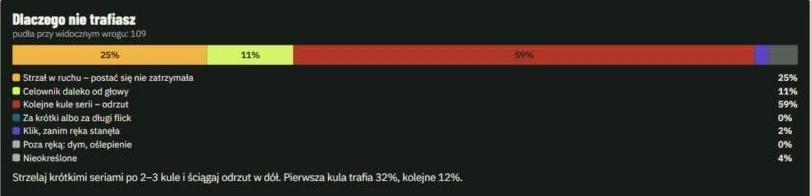
These are two matches played by the app's developer. After the first one, the analysis pointed at shooting while moving. After a week of practice that mistake dropped by half and the next one surfaced: the spray.
| Setting | Match 1 · Mirage | Match 2 · Nuke |
|---|---|---|
| Match aim (0–100) | 17 | 39 |
| Crosshair placement | 7.9° | 3.0° |
| Why you miss | ||
| Shot on the move – your character didn't stop | 49% | 25% |
| Follow-up bullets in a burst – recoil | 35% | 59% |
| Crosshair far from the head | 6% | 11% |
| Advice after the match | Stop your character before shooting. Standing still you hit 22%, on the move 10%. | Shoot short bursts of 2–3 bullets and pull the recoil down. Your first bullet hits 32%, the following ones 12%. |
Proof from match 1: round 18, FAMAS, 10 misses with the enemy visible. The shot was fired at 83% of movement speed, and shots are accurate only below 34%.

These are two matches on different maps, so treat this as an example, not as proof of progress.
You compared with the match
Each metric sits next to the average of the other players and the best player of the match. In this example crosshair placement and time to damage are fine, and the points are lost on accuracy with the enemy visible.
| Setting | You | Match average | Best player |
|---|---|---|---|
| Crosshair placement | 3.0° | 3.8° | 1.3° |
| Time to damage (TTD) | 180 ms | 319 ms | 305 ms |
| Counter-strafe | 68% | 77% | 90% |
| First-bullet accuracy | 32% | 33% | 45% |
| Accuracy with the enemy visible | 15% | 36% | 50% |
Coming to the app: version 2.1
Demo analysis will arrive in the app as a new tab in Matches. You load a .dem file, or the app finds the replays you downloaded in CS2 on its own.
- Why you miss. Every miss with the enemy visible gets a cause.
- Duels with a timeline. Enemy visible, player speed, hand speed and crosshair distance from the head.
- Clips from your screen. When you record a match in the app, the duel gets a clip and your hand movement from Raw Input.
- Fights, grenades, economy. KAST, damage per round, trades, opening duels and the most costly mistakes.
- A plan from your matches. Drills in the 3D arena matched to the causes of your misses.
A .dem file knows your view angle, but not your mouse movement. That is why we combine the replay with a recording of your hand.
New drill: Moving and stopping
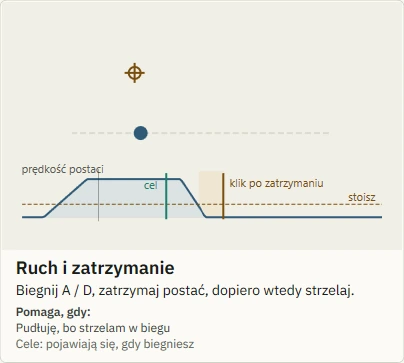
In the 3D arena you strafe with A and D. The target appears while you are moving. You stop your character and only then shoot.
- Who it is for: the analysis shows you miss because you shoot while running.
- How you will see progress: in the next match a larger share of your shots is fired while stopped.
Safety
A .dem file is the official replay that CS2 saves itself. The analysis reads that file after the match. The app does not read game memory, has no overlay and changes nothing in the CS2 files.
CS2 Game State Integration (GSI): is it safe? VAC and FACEIT
Questions and answers
Which matches can I send?
Premier, regular matchmaking and FACEIT. One post is one match.
Do I need the app?
No. For the analysis on Discord a .dem file is enough. The app adds hand movement and clips from your screen.
When will demo analysis be in the app?
In version 2.1. We are not giving a date yet.
What happens to my demo?
It is used only for analysis and for developing the app. We use a fragment in a video only with your consent.